Upload Files
Files can be uploaded to DeepLynx both through the UI and API
Uploading Files in the UI
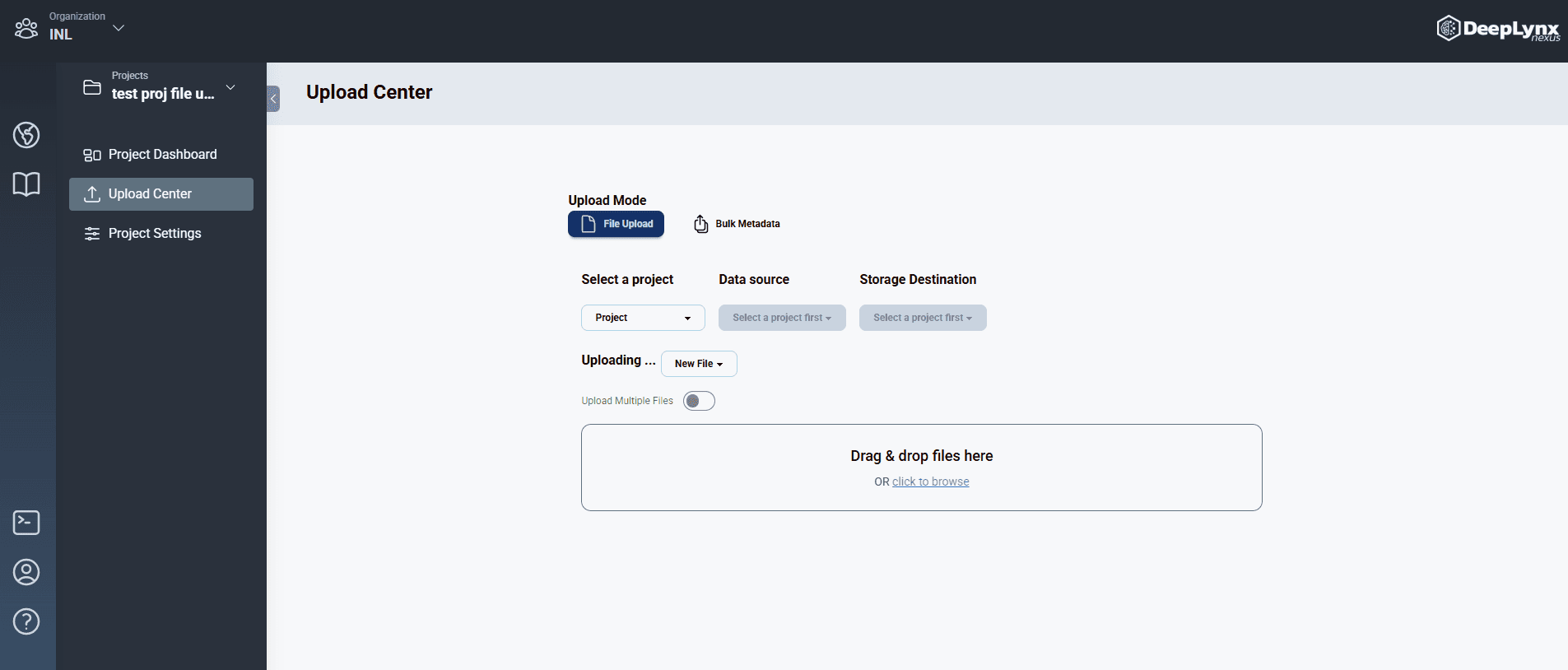
Follow these steps to upload a file through the DeepLynx interface:
- From the home page, navigate to the upload center.
- First select your project, datasource, and storage destination.
- Select your file to upload.
- If uploading more than one file select the multiple files option.
- If the file is Timeseries data be sure to select that option after uploading the file.
Uploading Files via API
DeepLynx supports two methods for uploading files via API:
- Regular Upload: For files under 500MB
- Chunked Upload: For files 500MB or larger (recommended for large files)
Regular File Upload (< 500MB)
To upload files using the API:
- First obtain an API Key
- Set up a POST request to
/organizations/{organizationId}/projects/{projectId}/files - Add the
Authorizationheader with the valueBearer [YOUR_API_KEY] - Include the file in the request body as form data with the key
file - Optionally add query parameters:
Query Parameters (both optional):
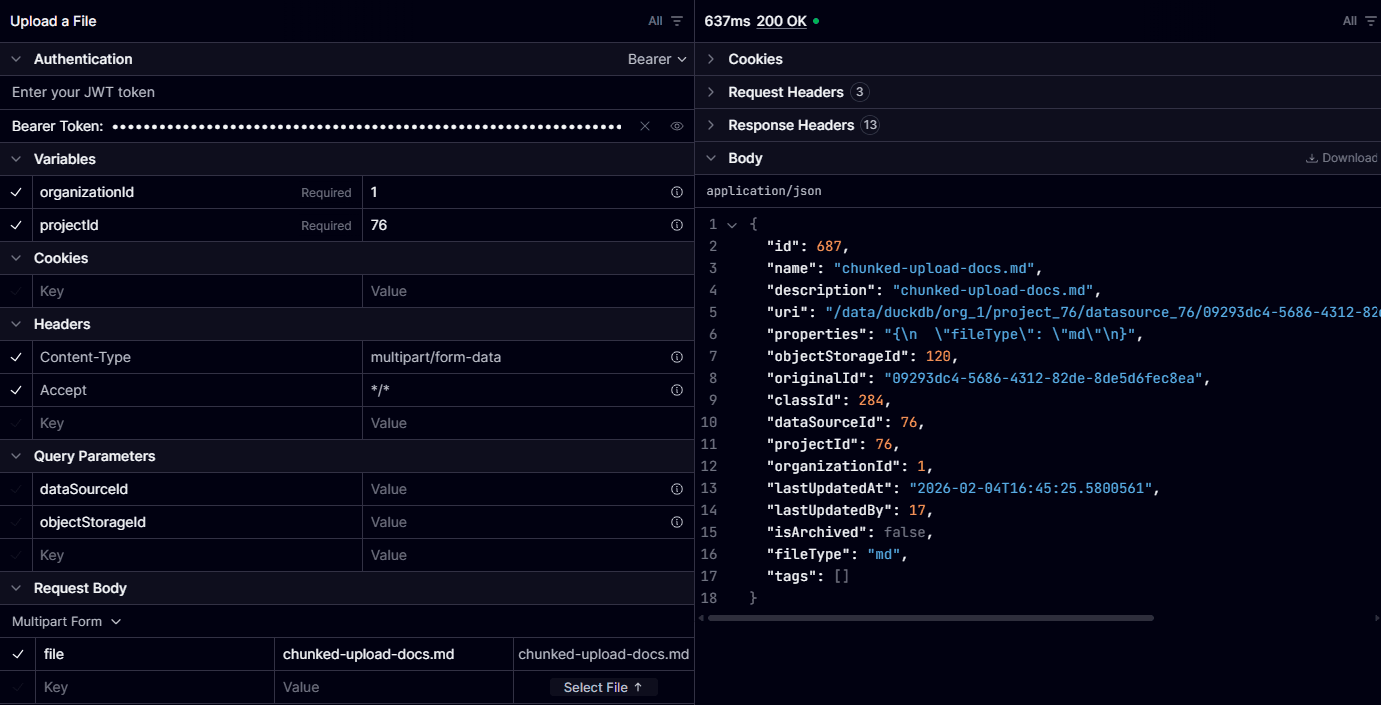
dataSourceId(optional): The ID of the datasource the file will be associated with. If not provided, the file will use the default datasource.objectStorageId(optional): The ID of the object storage the file should be saved to. If not provided, it will be uploaded to the default location.
Example 1: Using cURL with optional parameters
curl -X POST \
  "https://your-deeplynx-instance.com/organizations/123/projects/456/files?dataSourceId=789&objectStorageId=1" \
  -H "Authorization: Bearer YOUR_API_KEY" \
  -F "file=@/path/to/your/file.pdf"
This example explicitly specifies both the data source (789) and object storage (1).
Example 2: Using cURL without optional parameters
curl -X POST \
  "https://your-deeplynx-instance.com/organizations/123/projects/456/files" \
  -H "Authorization: Bearer YOUR_API_KEY" \
  -F "file=@/path/to/your/file.pdf"
This example uses the default data source and object storage for the project.
Important: The form field name must be file (not the filename itself).
Example using Scalar:
The Scalar interface example below shows a file upload without specifying the optional parameters, which will use project defaults:
Chunked File Upload (≥ 500MB)
For large files (500MB or greater), DeepLynx supports a chunked upload mechanism that breaks files into smaller pieces for more reliable uploads with progress tracking.
Chunk Size Configuration
Important: DeepLynx currently uses a chunk size of 100MB (configured server-side via the
RECOMMENDED_CHUNK_SIZEenvironment variable). The chunk size is determined by the backend and returned in the/upload/startresponse. Clients must use the exact chunk size provided by the server. While technically possible to override, doing so breaks the API contract and may lead to corrupted uploads or future compatibility issues.While chunked uploads are required for files ≥ 500MB (due to Cloudflare’s upload limits), you can optionally use chunked uploads for files of any size. Files smaller than the chunk size will simply upload as a single chunk. This may be useful if you want progress tracking or enhanced reliability for smaller files, though the regular upload endpoint is more efficient for files under 500MB.
Why Use Chunked Uploads?
Chunked uploads are required for files 500MB or larger due to:
- Cloudflare Upload Limits: Our infrastructure uses Cloudflare, which has a 500MB limit for single HTTP requests
- Improved Efficiency: Breaking large files into chunks allows for:
- Better error recovery (retry individual chunks instead of the entire file)
- Progress tracking for long-running uploads
- Parallel chunk uploads for faster transfer speeds
Note: Chunked uploads are currently in MVP (Minimum Viable Product) stage. In future releases, we plan to optimize upload speeds and improve stability. If you encounter any bugs, please report them through our support channels.
How Chunked Upload Works
The chunked upload process follows three phases:
1. START    → Initialize upload session, receive uploadId and chunk size
2. UPLOAD   → Upload file chunks (can be done in parallel)
3. COMPLETE → Server merges chunks and creates file record
API Endpoints
All chunked upload endpoints follow the base pattern:
/organizations/{organizationId}/projects/{projectId}/files/upload/...1. Start Chunked Upload
POST /upload/start
Initializes a chunked upload session.
Query Parameters:
dataSourceId(optional): ID of the datasourceobjectStorageId(optional): ID of object storage method
Request Body:
{
  "fileName": "large-file.zip",
  "fileSize": 1073741824
}
Field Types:
fileName(string, required): Name of the file being uploadedfileSize(long/number, required): Total size of the file in bytes
Response:
{
  "uploadId": "550e8400-e29b-41d4-a716-446655440000",
  "chunkSize": 104857600,
  "totalChunks": 11
}
The uploadId must be used for all subsequent chunk uploads. The chunkSize value determines how large each chunk should be.
2. Upload Chunk
POST /upload/chunk
Uploads a single chunk of the file.
Query Parameters:
dataSourceId(optional): ID of the datasourceobjectStorageId(optional): ID of object storage method
Form Data:
chunk(File): The chunk binary datauploadId(string): The upload session ID from startchunkNumber(int): Zero-indexed chunk number (0, 1, 2, …)
Response:
{
  "ChunkUploadStatus": "success"
}
Important Notes:
- Chunks are 0-indexed (first chunk is 0, not 1)
- Each chunk can be up to 500MB
- Failed chunks should be retried with exponential backoff
- Chunks can be uploaded in parallel (recommended: 4 concurrent uploads)
3. Complete Upload
POST /upload/complete
Finalizes the upload by merging chunks and creating the file record.
Query Parameters:
dataSourceId(optional): ID of the datasourceobjectStorageId(optional): ID of object storage method
Request Body:
{
  "uploadId": "550e8400-e29b-41d4-a716-446655440000",
  "fileName": "large-file.zip",
  "totalChunks": 11
}
Response:
{
  "id": 12345,
  "name": "large-file.zip",
  "description": "File uploaded via chunked upload (session: 550e8400-e29b-41d4-a716-446655440000)",
  "uri": "file:///storage/path/to/file",
  "properties": "{\"fileType\":\"zip\",\"uploadedViaChunking\":true,\"originalUploadId\":\"550e8400-e29b-41d4-a716-446655440000\"}",
  "objectStorageId": 1,
  "originalId": "a1b2c3d4-e5f6-7890-abcd-ef1234567890",
  "classId": 27,
  "dataSourceId": 789,
  "projectId": 456,
  "organizationId": 123,
  "lastUpdatedAt": "2026-02-04T10:30:00Z",
  "lastUpdatedBy": 10,
  "isArchived": false,
  "fileType": "zip",
  "tags": []
}
4. Cancel Upload
DELETE /upload/{uploadId}
Cancels an in-progress upload and cleans up temporary files.
Query Parameters:
dataSourceId(optional): ID of the datasourceobjectStorageId(optional): ID of object storage method
Response:
{
  "message": "Upload {uploadId} cancelled successfully"
}
Python Client Implementation
Below is a basic but complete Python implementation for integrating chunked uploads into your application. Note: this is a very quick implementation just to show the general flow of the API calls. Ofcourse, if a developer sees fit, make changes to match your client’s needs.
Note for TypeScript/React developers: DeepLynx is open source. For a TypeScript/React implementation example, in the near future developers should be able to refer to our implementation here source code on GitHub .
Python Implementation
import os
import math
import time
import requests
from typing import Optional, Callable
from dataclasses import dataclass
from concurrent.futures import ThreadPoolExecutor, as_completed

# Constants
CHUNK_THRESHOLD = 500 * 1024 * 1024  # 500MB
MAX_CONCURRENT_CHUNKS = 4
MAX_RETRIES = 3

@dataclass
class UploadProgress:
    percent_complete: float
    chunks_completed: int
    total_chunks: int
    upload_id: str

@dataclass
class ChunkedUploadSession:
    upload_id: str
    chunk_size: int
    total_chunks: int

class ChunkedFileUploader:
    def __init__(self, base_url: str, auth_token: str):
        """
        Initialize the chunked file uploader.

        Args:
            base_url: Base URL of your DeepLynx instance (e.g., 'https://your-instance.com')
            auth_token: Your DeepLynx API key
        """
        self.base_url = base_url.rstrip('/')
        self.auth_token = auth_token

    def upload_file_chunked(
        self,
        file_path: str,
        organization_id: int,
        project_id: int,
        data_source_id: Optional[int] = None,
        object_storage_id: Optional[int] = None,
        on_progress: Optional[Callable[[UploadProgress], None]] = None
    ) -> dict:
        """Upload a large file using chunked upload."""
        upload_id = None
        file_name = os.path.basename(file_path)
        file_size = os.path.getsize(file_path)

        try:
            # Phase 1: Start upload session
            upload_session = self._start_upload(
                organization_id,
                project_id,
                file_name,
                file_size,
                data_source_id,
                object_storage_id
            )
            upload_id = upload_session.upload_id

            # Phase 2: Upload chunks
            self._upload_chunks(
                file_path,
                upload_session,
                organization_id,
                project_id,
                data_source_id,
                object_storage_id,
                on_progress
            )

            # Phase 3: Complete upload
            result = self._complete_upload(
                organization_id,
                project_id,
                upload_id,
                file_name,
                upload_session.total_chunks,
                data_source_id,
                object_storage_id
            )

            if on_progress:
                on_progress(UploadProgress(
                    percent_complete=100.0,
                    chunks_completed=upload_session.total_chunks,
                    total_chunks=upload_session.total_chunks,
                    upload_id=upload_id
                ))

            return result

        except Exception as e:
            # Cleanup on failure
            if upload_id:
                try:
                    self._cancel_upload(
                        organization_id,
                        project_id,
                        upload_id,
                        data_source_id,
                        object_storage_id
                    )
                except Exception as cleanup_error:
                    print(f"Cleanup error: {cleanup_error}")
            raise e

    def _start_upload(
        self,
        organization_id: int,
        project_id: int,
        file_name: str,
        file_size: int,
        data_source_id: Optional[int],
        object_storage_id: Optional[int]
    ) -> ChunkedUploadSession:
        """Initialize chunked upload session."""
        url = f"{self.base_url}/organizations/{organization_id}/projects/{project_id}/files/upload/start"

        params = {}
        if data_source_id is not None:
            params['dataSourceId'] = data_source_id
        if object_storage_id is not None:
            params['objectStorageId'] = object_storage_id

        headers = {
            'Authorization': f'Bearer {self.auth_token}',
            'Content-Type': 'application/json'
        }

        response = requests.post(
            url,
            json={'fileName': file_name, 'fileSize': file_size},
            params=params,
            headers=headers
        )
        response.raise_for_status()

        data = response.json()
        return ChunkedUploadSession(
            upload_id=data['uploadId'],
            chunk_size=data['chunkSize'],
            total_chunks=data['totalChunks']
        )

    def _upload_chunks(
        self,
        file_path: str,
        session: ChunkedUploadSession,
        organization_id: int,
        project_id: int,
        data_source_id: Optional[int],
        object_storage_id: Optional[int],
        on_progress: Optional[Callable[[UploadProgress], None]]
    ):
        """Upload file chunks in parallel batches."""
        chunks_completed = 0
        total_chunks = session.total_chunks

        with open(file_path, 'rb') as f:
            chunk_number = 0

            while chunk_number < total_chunks:
                # Prepare batch of chunks
                batch_tasks = []
                for _ in range(min(MAX_CONCURRENT_CHUNKS, total_chunks - chunk_number)):
                    chunk_data = f.read(session.chunk_size)
                    if not chunk_data:
                        break

                    batch_tasks.append({
                        'chunk_number': chunk_number,
                        'chunk_data': chunk_data,
                        'organization_id': organization_id,
                        'project_id': project_id,
                        'upload_id': session.upload_id,
                        'data_source_id': data_source_id,
                        'object_storage_id': object_storage_id
                    })
                    chunk_number += 1

                # Upload batch in parallel
                with ThreadPoolExecutor(max_workers=MAX_CONCURRENT_CHUNKS) as executor:
                    futures = [
                        executor.submit(self._upload_single_chunk, task)
                        for task in batch_tasks
                    ]

                    for future in as_completed(futures):
                        future.result()  # Raise exception if chunk failed
                        chunks_completed += 1

                        # Report progress
                        if on_progress:
                            percent = (chunks_completed / total_chunks) * 100
                            on_progress(UploadProgress(
                                percent_complete=round(percent, 1),
                                chunks_completed=chunks_completed,
                                total_chunks=total_chunks,
                                upload_id=session.upload_id
                            ))

    def _upload_single_chunk(self, task: dict):
        """Upload a single chunk with retry logic."""
        chunk_number = task['chunk_number']

        for attempt in range(1, MAX_RETRIES + 1):
            try:
                url = f"{self.base_url}/organizations/{task['organization_id']}/projects/{task['project_id']}/files/upload/chunk"

                params = {}
                if task['data_source_id'] is not None:
                    params['dataSourceId'] = task['data_source_id']
                if task['object_storage_id'] is not None:
                    params['objectStorageId'] = task['object_storage_id']

                files = {'chunk': (f'chunk_{chunk_number}', task['chunk_data'])}
                data = {
                    'uploadId': task['upload_id'],
                    'chunkNumber': str(chunk_number)
                }

                headers = {
                    'Authorization': f'Bearer {self.auth_token}'
                }

                response = requests.post(url, files=files, data=data, params=params, headers=headers)
                response.raise_for_status()
                return  # Success

            except Exception as e:
                print(f"Chunk {chunk_number} failed (attempt {attempt}/{MAX_RETRIES}): {e}")

                if attempt == MAX_RETRIES:
                    raise Exception(f"Chunk {chunk_number} failed after {MAX_RETRIES} attempts")

                # Exponential backoff
                time.sleep(1 * attempt)

    def _complete_upload(
        self,
        organization_id: int,
        project_id: int,
        upload_id: str,
        file_name: str,
        total_chunks: int,
        data_source_id: Optional[int],
        object_storage_id: Optional[int]
    ) -> dict:
        """Complete the chunked upload."""
        url = f"{self.base_url}/organizations/{organization_id}/projects/{project_id}/files/upload/complete"

        params = {}
        if data_source_id is not None:
            params['dataSourceId'] = data_source_id
        if object_storage_id is not None:
            params['objectStorageId'] = object_storage_id

        headers = {
            'Authorization': f'Bearer {self.auth_token}',
            'Content-Type': 'application/json'
        }

        response = requests.post(
            url,
            json={
                'uploadId': upload_id,
                'fileName': file_name,
                'totalChunks': total_chunks
            },
            params=params,
            headers=headers
        )
        response.raise_for_status()
        return response.json()

    def _cancel_upload(
        self,
        organization_id: int,
        project_id: int,
        upload_id: str,
        data_source_id: Optional[int],
        object_storage_id: Optional[int]
    ):
        """Cancel an in-progress upload."""
        url = f"{self.base_url}/organizations/{organization_id}/projects/{project_id}/files/upload/{upload_id}"

        params = {}
        if data_source_id is not None:
            params['dataSourceId'] = data_source_id
        if object_storage_id is not None:
            params['objectStorageId'] = object_storage_id

        headers = {
            'Authorization': f'Bearer {self.auth_token}'
        }

        response = requests.delete(url, params=params, headers=headers)
        response.raise_for_status()


# Usage Example
if __name__ == "__main__":
    uploader = ChunkedFileUploader(
        base_url="https://your-deeplynx-instance.com",
        auth_token="your-api-key"
    )

    def progress_callback(progress: UploadProgress):
        print(f"Progress: {progress.percent_complete}% "
              f"({progress.chunks_completed}/{progress.total_chunks} chunks)")

    result = uploader.upload_file_chunked(
        file_path="/path/to/large-file.zip",
        organization_id=123,
        project_id=456,
        data_source_id=789,
        on_progress=progress_callback
    )

    print(f"Upload complete! File ID: {result['id']}")
Best Practices for Chunked Uploads
1. Chunk Size Management
- Always use the
chunkSizereturned from the/upload/startendpoint - Don’t hardcode chunk sizes - let the backend determine the optimal size
- The backend configures this via the
RECOMMENDED_CHUNK_SIZEenvironment variable
2. Error Handling & Retries
- Implement exponential backoff for failed chunks (1s, 2s, 3s delays)
- Retry individual chunks up to 3 times before failing the entire upload
- Always call the cancel endpoint (
DELETE /upload/{uploadId}) on failure to cleanup temporary files
3. Parallelization
- Upload 4 chunks concurrently for optimal throughput
- Don’t exceed 4 concurrent requests to avoid overwhelming the server
- Process chunks in sequential batches (batch 1: chunks 0-3, batch 2: chunks 4-7, etc.)
4. Progress Tracking
- Report progress after each batch completes (not after each individual chunk)
- Calculate percentage as:
(chunksCompleted / totalChunks) * 100 - Include
uploadIdin progress events for tracking multiple simultaneous uploads
5. Cleanup
- Always cleanup temporary files on both success and failure
- Call the cancel endpoint if the upload is interrupted or fails
- Implement timeout handling (recommended: 30 minutes maximum for entire upload)
Common Issues & Solutions
Issue: “Missing chunk X of Y”
- Cause: Not all chunks were successfully uploaded before calling complete
- Solution: Verify all chunks uploaded successfully before finalizing
Issue: “Upload session not found”
- Cause: Invalid uploadId or session expired
- Solution: Restart the upload process from
/upload/start
Issue: Slow upload speeds
- Cause: Not using parallel chunk uploads
- Solution: Implement concurrent chunk uploads (4 simultaneous)
Issue: High memory usage
- Cause: Loading entire file into memory before chunking
- Solution: Use streaming/slicing to process chunks incrementally
Need Help?
If you need help or have any questions, feel free to reach out to us through our support channels. We’re here to help!
Thank you for being a part of our community. We hope you find the documentation helpful and look forward to your feedback!