Oauth 2.0 Integration Guide
DeepLynx Nexus acts as an OAuth 2.0 identity provider . Developers can use Nexus as an identity service for their other applications. This article outlines the steps necessary to get your application registered with Nexus so you can begin using it as an OAuth provider.
Overview
Nexus implements the Oauth 2.0 Authorization Code flow, allowing your application to securely access Nexus resources on behalf of authenticated users. The flow involves:
- Redirecting users to Nexus for authentication
- Receiving an authorization code via callback
- Exchanging the code for an access token
- Using the token to make authenticated API requests
Prerequisites
Before you begin, ensure you have:
- Users who have Nexus accounts with appropriate permissions to execute the desired API calls
- A running application with a publicly accessible callback URL
- Basic understanding of OAuth 2.0 concepts
Register Your OAuth Application
Work with your Nexus system administrator to register your application.
NOTE: If you are on a local development instance of Nexus, you can make yourself the SysAdmin by setting the SUPERUSER_EMAIL environment variable to your registered okta email address.
As a system administrator, you can access the Site Mangement page by clicking the gear icon in the lower left of the application window:

You may then register new applications under “Oauth Applications” (middle tab):
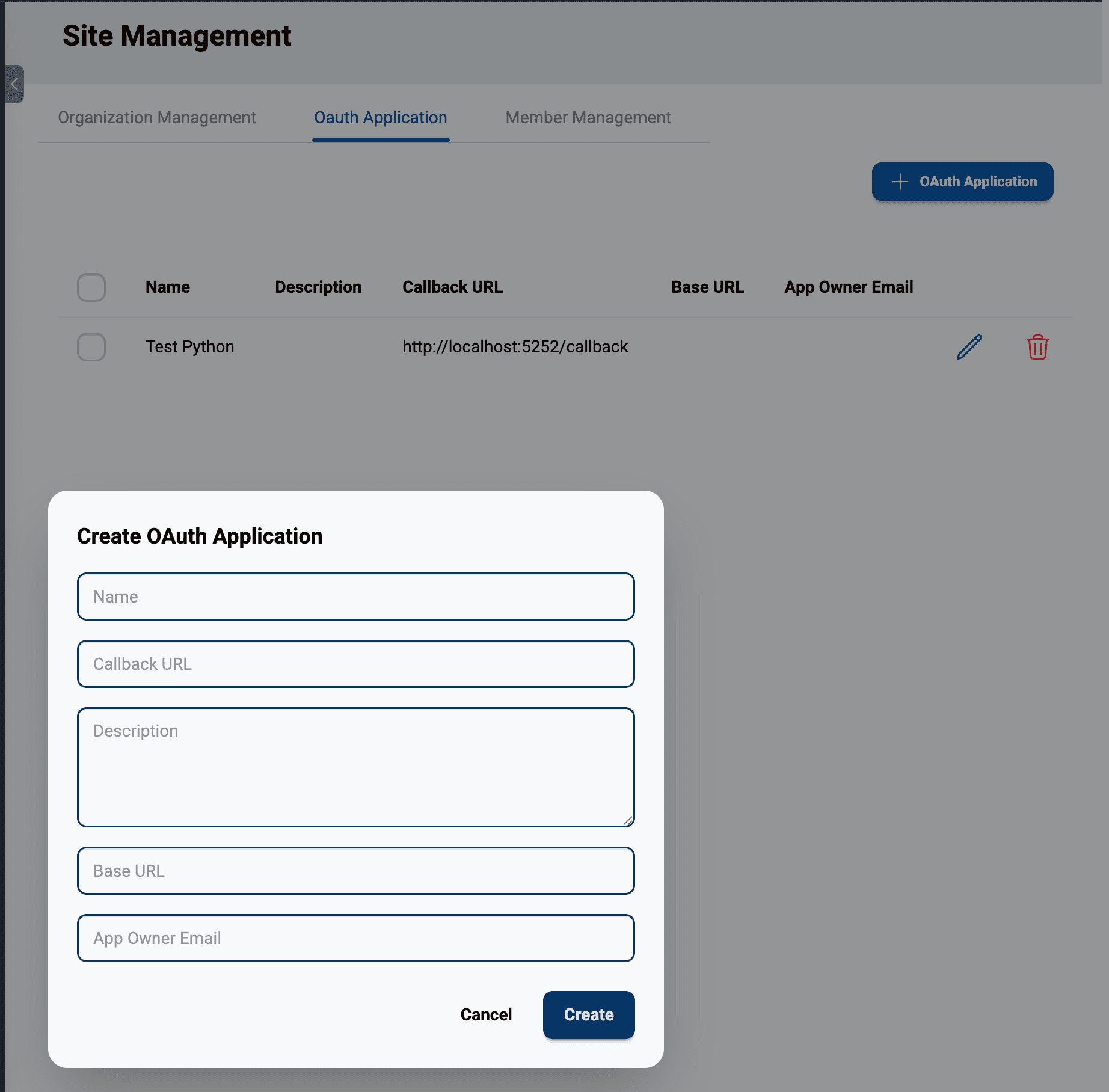
When registering your application, you’ll need to provide:
- Application Name: A name or alias for your application
- Redirect URI: The callback URL where users will be redirected after authorization (e.g.,
https://yourapp.com/oauth/callback)
Additionally, you may want to provide these optional parameters:
- Description: Additional description of your application and what it does
- Base URL: The URL for your application. For DeepLynx Ecosystem developers, this can be used to aid in a smooth UI experience when transitioning between apps without necessitating environment variables for these apps’ URLs.
- Owner Email: The email address of the application developer or point of contact, in case any issues with the registered application arise
After registration, you will receive (from the System Administrator):
- Client ID: A public identifier for your application
- Client Secret: A confidential secret for authenticating your application
Critical: Store your Client Secret securely. Never expose it in client-side code, version control, or public repositories. Use environment variables or a secrets management service.
Initiate the Authorization flow
When a user wants to connect your application to Nexus, redirect them to the Nexus authorization endpoint.
Authorization Endpoint
GET {frontendUrl}/api/oauth/authorizeRequired parameters
| Parameter | Description |
|---|---|
client_id | Your application’s Client ID |
redirect_uri | Must exactly match the callback URI registered with your application |
state | A random string for CSRF protection |
** Example Authorization URL **
Note that this example uses a client-side /login endpoint to trigger the Oauth handshake. This is not required, but redirecting to the /oauth/authorize is a requirement.
import secrets
from urllib.parse import urlencode
from flask import Flask, redirect

app = Flask(__name__)

@app.route('/login')
def login():
    state = secrets.token_urlsafe(32)

    # Build authorization URL
    params = {
        'client_id' = 'stored_client_id_123',
        'redirect_uri' = 'https://yourapp.com/oauth/callback',
        'state' = state
    }

    auth_url = f"https://nexus.example.com/api/oauth/authorize?{urlencode(params)}"

    return redirect(auth_url)
** What happens next **
- The user is redirected to Nexus and prompted to sign in (if not already authenticated)
- Nexus validates your Client ID and Redirect URI
- Nexus redirects back to your callback URL with an authorization code
Extract Code and State from the Callback Endpoint
Create an endpoint in your application to receive the authorization code and exchange it for an access token.
** Callback Parameters **
When Nexus redirects back to your application, the URL will include:
| Parameter | Description |
|---|---|
code | The authorization code created by Nexus (short-lived, single-use) |
state | The CSRF state string you provided in step 2 |
** Example Callback Handler **
from flask import Flask, request, session, redirect
import requests

app = Flask(__name__)

@app.route('/oauth/callback')
def oauth_callback():
    # Extract parameters from callback URL
    code = request.args.get('code')
    state = request.args.get('state')

    # Any additional validation should occur here, such as
    # comparing state or checking for errors from Nexus.

    # Proceed to token exchange...
Exchange Code for Access Tokens
After validating the callback, exchange the authorization code for an access token.
** Token Exchange Endpoint **
NOTE: The /exchange endpoint uses v1 in the route due to being a backend route. /authorize does not use v1 because it is a frontend proxy endpoint. Lack of attention to this difference will likely result in errors.
POST {backendUrl}/api/v1/oauth/exchange** Required Parameters **
| Parameter | Description |
|---|---|
code | The authorization code from the callback |
client_id | Your application’s Client ID |
client_secret | Your application’s Client Secret |
redirect_uri | Must match the URI used in the authorization request |
state | The same state value from the authorization request |
expiration | (Optional) token lifetime in minutes (default: 480) |
** Example Token Exchange **
def exchange_code_for_token(code, state):
    token_url = 'https://nexus.example.com/api/v1/oauth/exchange'

    params = {
        'code': code,
        'state': state,
        'client_id': 'stored_client_id_123',
        'client_secret': 'stored_client_secret_456',
        'redirect_uri': 'https://yourapp.com/oauth/callback',
        'state': state,
        'expiration': 480 # 8 hours
    }

    response = requests.post(token_url, params=params)
    token_data = response.json()
    return token_data
** Successful Response **
{
  "access_token": "eyJhbGciOiJIUzI1NiIsInR5cCI6IkpXVCJ9...",
  "token_type": "Bearer",
  "expires_in": 28800,
  "state": "abc123..."
}
The expires_in value is in seconds (e.g., 288000 seconds = 8 hours).
Store Tokens securely
Proper token storage is critical for security. Store tokens on your backend server, never in client-side code. Encrypt tokens at rest in your database, and use HTTPS for all communications. It is also recommended that you implement token expiration checking and/or some sort of token refresh mechanism. Never store tokens in localStorage or cookies accessible to JavaScript. Never log tokens in plaintext nor commit them to version control.
Make Authenticated API Requests
Now that you have your access token, you can include it in the Authorization header of all API requests to Nexus.
def get_nexus_api(token, endpoint):
    headers = {
        'Authorization': f'Bearer {token}',
        'Content-Type': 'application/json'
    }

    response = requests.get(endpoint, headers=headers)

    return response.json()
Complete Example Implementation
Here’s a minimal Flask application demonstrating the complete Oauth flow:
import secrets
from flask import Flask, request, redirect, session, jsonify
import requests

app = Flask(__name__)
app.secret_key = 'your-secret-key'

# Configuration
CLIENT_ID = 'your_client_id_123'
CLIENT_SECRET = 'your_client_secret_456'
REDIRECT_URI = 'http://localhost:8080/callback'
AUTHORIZATION_URL = 'https://nexus.example.com/api/oauth/authorize'
TOKEN_URL = 'https://nexus.example.com/api/v1/oauth/exchange'

@app.route('/login')
def login():
    # Generate state for CSRF protection
    state = secrets.token_urlsafe(32)
    session['oauth_state'] = state

    # Build authorization URL
    auth_url = f"{AUTHORIZATION_URL}?" \
               f"client_id={CLIENT_ID}&" \
               f"redirect_uri={REDIRECT_URI}&" \
               f"state={state}"

    return redirect(auth_url)

@app.route('/callback')
def callback():
    code = request.args.get('code')
    state = request.args.get('state')

    # Verify state
    if state != session.get('oauth_state'):
        return "Invalid state", 400

    session.pop('oauth_state', None)

    # Exchange code for token
    token_response = requests.post(TOKEN_URL, params={
        'code': code,
        'client_id': CLIENT_ID,
        'client_secret': CLIENT_SECRET,
        'redirect_uri': REDIRECT_URI,
        'state': state,
        'expiration': 480
    })

    if token_response.status_code != 200:
        return "Token exchange failed", 400

    token_data = token_response.json()
    session['access_token'] = token_data['access_token']

    return redirect('/dashboard')

@app.route('/api/data')
def get_data():
    token = session.get('access_token')
    if not token:
        return redirect('/login')

    response = requests.get(
        'https://nexus.example.com/api/v1/projects/GetAllProjects',
        headers={'Authorization': f'Bearer {token}'}
    )

    if response.status_code == 401:
        return redirect('/login')

    return jsonify(response.json())

if __name__ == '__main__':
    app.run(port=8080, debug=True)
Note that the examples in this article are more or less pseudocode and are not guaranteed to work. Please adjust the examples accordingly in the language of your application and using your configuration values.